Token Optimisation 101: Stop Burning Money on AI Coding Agents
How to stop getting rate-limited after an hour on Claude Code, Codex, or Copilot. Context window mechanics, the /effort command, model routing, kicking new conversations, and the silent token drains most people miss.
The Split
I wrote about Peter Steinberger's approach to AI coding a while back. One of his key principles: keep things simple, don't overthink the setup, just talk to it. Solid advice.
But lately I've been seeing a proper split forming. Half the posts on my feed are people saying "AI coding agents changed my life." The other half are saying "ran out of tokens in twenty minutes" or "rate limited for the entire week after two days" or "one hour in and locked out for the 5-hour window." Some of these are Codex, plenty are Claude, a few are Copilot. Same tools. Wildly different experiences.
And it's not talent. It's mechanics. The people burning through tokens in twenty minutes are driving the thing wrong. Not stupidly wrong, just uninformed wrong. Nobody teaches you this stuff. You sign up, you start chatting, you hit rate limits, you get frustrated.
So here's some of the stuff and experiences of balancing optimised output versus optimised token usage. Applies to Codex, Copilot, and Claude, but I use Claude Code day-to-day so most of the specifics are from there. No viral prompt templates. No "10x developer" nonsense. Just the mechanical things that reduce waste and improve output. Here's the bit that surprises people: a lean, focused context produces better results than a bloated one. You save tokens AND get better work. Same direction, not a trade-off.
Right. Let's crack on.
The Maths Nobody Tells You
Every message you send makes the model re-read the ENTIRE conversation history. Message 1 costs 1x. Message 10 costs 10x. Message 30 costs 31x more than message 1. Most people burn tokens without even knowing it.
This is not a Claude thing. It's how every LLM works. The model has no memory between messages. Every turn, it reads the full conversation from scratch. Your system prompt, every previous message, every response, every tool call result. All of it. Every single time.
Once you understand that, everything else follows.
Know Your Usage (Before You Optimise Anything)
You can't optimise what you can't see. Before fiddling with any settings, get visibility into where your tokens are actually going.
For Claude Code specifically, ccusage gives you a nice breakdown. For Codex, CodexBar by Peter Steinberger sits in your menu bar and shows active session usage.
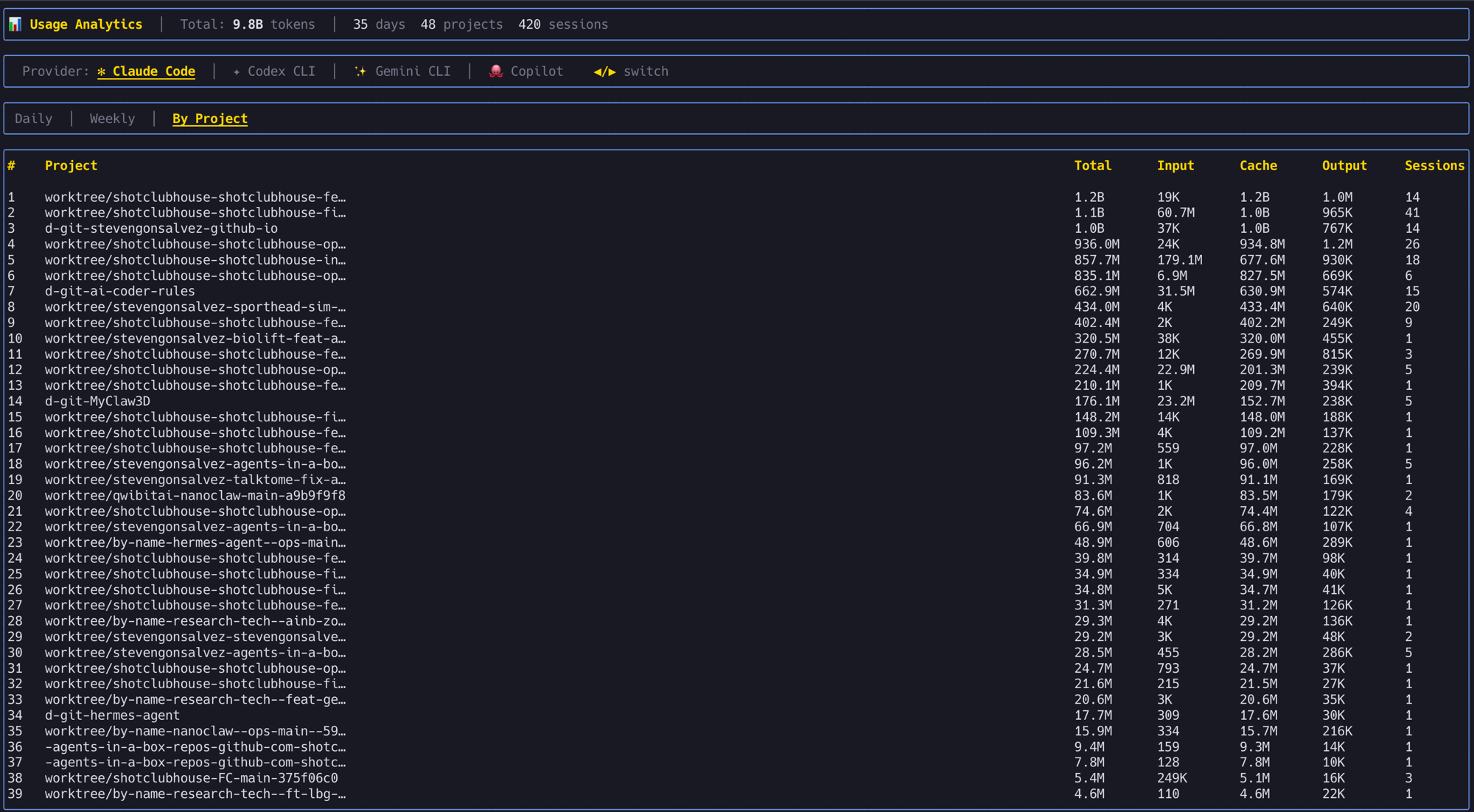
I use my agents-in-a-box TUI which tracks usage across Claude Code, Codex, Gemini CLI, and Copilot in one dashboard:
There's also a /token-usage skill that gives you a quick markdown report right in your agent session:
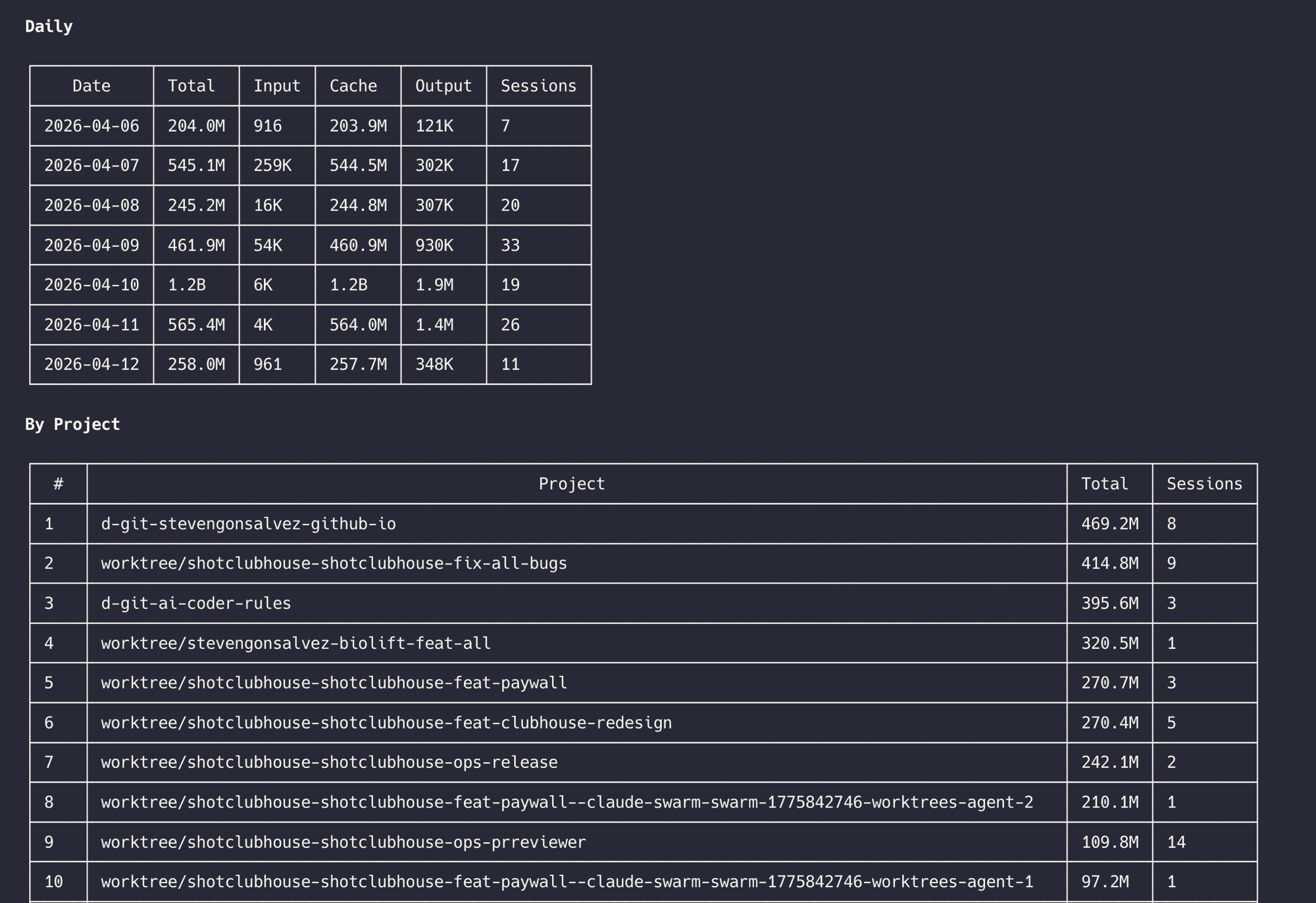
The point: if you're not tracking usage, you're guessing. And guessing is how people end up rate-limited after an hour wondering what happened.
The Low-Hanging Fruit
Cap your conversations
15-20 messages, then start fresh. By message 30 you're paying 31x what message 1 cost. But it's not just tokens. Once you've burned past about 60% of the context window, the model's output quality starts dropping. It's wading through so much stale conversation that it loses focus on the current task. Use a /handover to carry context to the next session. Cheaper and sharper output.
Edit, don't correct
Wrong answer? Don't send "no, I meant X." That stacks. Hit Edit on the original message instead. Edits replace the conversation from that point. Corrections make it longer.
One message, many tasks
"Refactor the auth, add the rate limiter, update both tests." One context load. Three separate prompts for the same work? Three context loads. Think of it like a brief, not a conversation. Draft what you need, send it in one go. All modern agent harnesses (Claude Code, Codex, Copilot) have proper stateful task management now, so the agent will track progress across all three tasks within a single turn. No need to micromanage one at a time.
Projects over chat uploads
This one is for Claude Desktop or ChatGPT. Files in a Project: cached once, reused everywhere. Files in a chat: re-processed every message. Same for preferences. Put "I use TypeScript, Tailwind, Vercel" in Memory once instead of typing it every session.
Kill idle features
For desktop apps: web search, connectors, extended thinking all load tool definitions into your context whether you use them or not. Turn off what you're not actively using. For CLI agents: stay away from MCP where possible, it's a context tax. If you must use MCP tools, use mcporter to call them from the command line without loading schemas into your window.
Route your models
Haiku for throwaway questions. Sonnet for daily work. /model opusplan for architecture (Opus thinks, Sonnet executes). Opus for the genuinely hard stuff. Stop using the most expensive model for "add a console.log."
Spread the load
Claude Code's rate limit resets on a rolling 5-hour window. Two hours of hammering eats the whole budget and then you're staring at a cooldown timer.
The trick: figure out when your window resets. Run /usage in Claude Code to see where you stand. Then set up a cron or /schedule to kick off your next session right when the window opens. I have a reminder that fires every 5 hours so I get the full slot every time. Morning slot, afternoon slot, evening slot. Three full windows a day if you plan it.
Avoid 5-11AM Pacific on weekdays if you can. That's when load-based throttling is heaviest because the US has just woken up and everyone's prompting at once.
Controlling the Thinking Budget
This is the one most people skip right past. The model doesn't just read your prompt and respond. It thinks first. Internal reasoning that you don't see but you absolutely pay for. And the amount of thinking swings wildly depending on how you configure it.
The /effort command
The official way to control this in Claude Code is /effort. Type /effort low and the model barely thinks before acting. Type /effort max and it goes deep on every prompt, reasoning extensively before doing anything.
The default is auto, which means Claude decides how hard to think per turn. But here's the thing: auto is not always optimal. Sometimes you know the task is simple and you don't want the model spending 500 thinking tokens deciding how to rename a variable. Sometimes you know it's hard and you want it to take its time.
Being the driver, manually adjusting effort based on what you're about to ask, is both better output AND fewer tokens. Let the model decide and it'll sometimes overthink cheap tasks and sometimes underthink expensive ones.
What actually changes at different effort levels
It's not just "more thinking tokens." The entire behaviour shifts:
At low effort: Skips reasoning entirely for simple tasks. Proceeds directly to action without preamble. Fewer tool calls. Reads fewer files. Faster, cheaper, often good enough.
At high/max effort: Deep reasoning on every prompt, even straightforward ones. More willing to read related files and dependencies you didn't ask about. Runs extra verification commands. Plans more broadly. Longer, more detailed responses with more code comments.
The cost difference: Max effort can use up to 10x more tokens than low effort for the same prompt. Those thinking tokens are billed at the same rate as output tokens. The time-to-first-word is noticeably longer too because it's generating hundreds of hidden reasoning tokens before showing you anything.
The informal way
Drop "think harder" or "ultrathink" into your prompt and the model responds with deeper reasoning. These aren't official settings. They're prompt tricks that work in practice because the model picks up on the intent. "Take your time", "be comprehensive", "read all related code", "form hypotheses" all push toward deeper reasoning.
Sometimes these are faster than switching effort levels mid-conversation. You don't change a global setting, you just nudge one turn.
My default
I leave effort on auto most of the time but override for specific patterns:
- Renaming, formatting, simple edits:
/effort low - Standard feature work: auto (let it decide)
- Architecture, debugging hard problems, reviewing unfamiliar code:
/effort high - Planning a multi-step implementation:
/effort max
The key insight: you're the driver. The model is the engine. Auto is cruise control. Manual is faster when you know the road.
For Engineers (The Real Savings)
Keep your CLAUDE.md lean
Your CLAUDE.md gets loaded into every single message. Every line costs tokens on every turn. If your CLAUDE.md is 2,000 tokens and you send 30 messages, that's 60,000 tokens just on the system prompt.
Strip it ruthlessly. Remove commented-out rules. Remove "nice to have" guidelines. Keep only what changes the model's behaviour. If a rule would be followed anyway without being stated, delete it.
For heavy CLAUDE.md files, use caveman compression to strip grammar while preserving meaning. 40-50% savings on input tokens that compound across every message.
Skills over re-explaining
Instead of writing "when you write tests, use vitest with this pattern and always mock the database..." in every prompt, encode it as a skill. Skills load on demand, not every message. The model reads the skill when it needs it, not when it doesn't.
One skill file that loads when relevant is cheaper than 500 tokens of instructions that load every single turn.
Subagents: powerful but expensive
Subagents (the Task tool, spawned agents) get a fresh context window. That's their superpower: clean context means better output on focused tasks. No conversation history dragging them down.
But each subagent starts from scratch. Your system prompt, CLAUDE.md, any files it reads, all billed fresh. Five subagents doing five tasks is five full context loads. One agent doing five tasks sequentially is one context load that grows.
When to subagent: Research tasks where you need clean reasoning. Parallel work on independent files. Tasks that benefit from isolation, like getting a code review done while you keep developing, or running tests in parallel with feature work.
When not to: Sequential tasks that share context. Quick operations that don't need a fresh window. Anything where the setup cost exceeds the task cost.
Don't let automation drain you silently
If you're using /loop or /schedule to run recurring tasks, check what they're actually consuming. An improperly configured loop running every 5 minutes can burn through your token budget faster than any amount of interactive coding. I've seen agents polling for status every 10 minutes, each poll loading the full system prompt and CLAUDE.md, doing 288 context loads a day on autopilot. That's a proper silent drain.
Set up monitoring before you set up automation. Know what each loop costs per cycle. Kill anything that isn't earning its keep.
Avoid the MCP context tax
Every MCP server you connect dumps its tool schemas into your context. Playwright MCP alone is 15,000 tokens of definitions loaded every message. Connect three servers and you've burned half your context on tool descriptions.
Use mcporter to call MCP tools from the command line instead. Your agent runs a bash command, gets the result. The tool schemas never touch the context window. See The Death of MCP for the full argument.
Prompt caching
This happens under the hood in Claude Code, Codex, and most agent harnesses, but understanding it changes how you structure things.
The model caches the static parts of your conversation. Your system prompt, CLAUDE.md, tool definitions, project files. If those stay the same between messages, they're read from cache instead of being re-processed from scratch. Cached tokens cost roughly 10% of uncached tokens.
What this means in practice: the stuff at the top of your context (system prompt, CLAUDE.md, skills) gets cached automatically. The stuff at the bottom (your latest message, recent conversation) doesn't. So a 3,000 token CLAUDE.md that stays identical across 30 messages costs full price once and 10% for the other 29.
Where people break caching without realising: changing your CLAUDE.md mid-session (invalidates the cache), connecting or disconnecting MCP servers (changes tool definitions), or uploading new files to the conversation (shifts the static prefix). Every time the "top" of your context changes, the cache resets and you pay full price again.
The practical takeaway: set up your CLAUDE.md, skills, and project files before you start working. Don't fiddle with them mid-session. Front-load the stable stuff, keep the dynamic stuff at the end. The cache does the rest.
Next: Autonomous Self-Improving Agents That Build Software
This deserves its own long-form piece. Everything above is you doing the optimising. The next level is agents that do it for themselves, and that's a proper rabbit hole.
From memory management with tools like /reflect, towards lossless context management, gossip protocols for multi-agent coordination, GraphRAG and vector memory for long-term recall, session journals that compress intelligently instead of just truncating, auto-improving skills that evolve based on usage patterns, self-routing models that pick their own effort level based on measured outcomes. We're building a lot of this into wololo's agent intelligence layer, while building out  shotclubhouse.com.
Too much to cover here. Will dive into all of it properly soon. For now, the tips above will sort out the worst of the token waste. The autonomous bit is what makes it compound.